





Downloads

Our applications are open source and auditable.


Downloads

Google Play App Store Android Private Windows Mac Linux

Your private keys also work with all official WireGuard apps across all devices.
View our open source code


FAQ

General & Basics
What is a VPN?

A VPN encrypts your connection and routes it through a secure tunnel. Your ISP, employer, or government cannot see what you do. Your IP is replaced with ours so sites see our address, not yours.

Why does it matter?

ISPs log what you visit. The UK forces providers to store a year of browsing history. Australia shares data with the rest of the Five Eyes alliance. Once traffic is stored, it is permanent. A VPN breaks that visibility.

What makes Blackout VPN different?

No accounts. No trackers. No analytics. You buy a key and connect. We do not build user databases or upsell fake features that exist to collect data. Privacy is the product, not bait for a subscription trap.

Can a VPN make me completely anonymous?

No. A VPN hides your IP and traffic from networks you pass through. If you sign in to a service, that service still knows who you are. Use aliases where possible for companies that do not require KYC.

How are you different from big VPN brands?

Many large VPN providers require accounts linked to your email, embed analytics in their apps, and depend on affiliate tracking systems to measure conversions. That means identifiers and usage data still exist somewhere, even if they claim "no logs." Privacy fails the moment your identity exists in the system.

We remove that entire layer. No accounts, no tracking, no analytics. You pay for access, not with your data.

What can a VPN not do?

A VPN hides your traffic path and IP. It cannot erase data a site already has on you, stop cookies you accept, or make a logged-in account anonymous.

Will a VPN stop ISP throttling?

It often stops targeted throttling because your ISP cannot see what you are doing. It cannot bypass raw network congestion or hardware limits.

Is using a VPN legal in Australia?

Yes. Using a VPN is legal in Australia. There are no laws prohibiting it.

Keys & Devices
What will I actually receive?

You will receive a download link via email or Session. The link contains two zip files, one for your phone and one for your computer. Each zip contains a .conf file for each server region. You import the zip into the WireGuard app on your device and all regions load automatically. Tap or click any region to connect. Windows users get the config bundled with the installer, so no separate download is needed.

Can you recover my VPN key if I lose it?

No. WireGuard requires your public key to be stored on the server to authenticate your connection, but that key is a random string with no identity attached. We do not store your private key or any way to regenerate it. To receive a replacement, retain at least one original .conf file as proof of purchase. This is why we strongly encourage keeping backups in at least two places. If all keys are lost and you have nothing to verify against, we are unable to help.

Do my keys work across all devices?

A key works on any operating system, but only one device at a time. If the same key is used on two devices at the same time, they will interfere with each other and knock each other offline. To use multiple devices at once, use separate keys.

How many devices can I use?

Each plan includes up to five private keys. Each private key supports one device at a time. We issue two keys by default and provide the rest on request.

Do my keys expire?

Yes. When your plan ends, your key stops connecting. No auto renewals or marketing emails. You buy more time only when you want it.

How should I backup my keys?

Save the .conf or bundle in at least two places you control, like an encrypted drive, an offline USB stick, or a password manager that supports file attachments. Windows users already have a copy in Documents/Blackout VPN from the installer, which counts as one.

Can I edit the config file?

Advanced users can, but small changes can break routing or remove protections. If you are unsure, ask us and we will provide a safe replacement or guide you.

Can I run Blackout VPN on my router?

Yes, if your router supports WireGuard. Most consumer routers do not out of the box. You need custom firmware like OpenWrt or DD-WRT. Flashing firmware replaces your router's operating system, is not reversible on most hardware, voids your warranty, and carries a real risk of bricking the device if done incorrectly.

If your router already runs OpenWrt, import your .conf file the same way you would on any WireGuard device. Setup documentation is at openwrt.org.

We do not provide direct support for router-level setup. If you are unsure, install Blackout VPN on individual devices instead. If you are experienced and get stuck, feel free to reach out and we can point you in the right direction.

Does it work on smart TVs or gaming consoles?

Most smart TVs and gaming consoles do not support WireGuard natively. The practical options are router-level setup (see the router FAQ above), which protects every device on your network including TVs and consoles without installing anything on the device itself.

Some Android TVs support WireGuard directly via the app. If your device runs Android TV, search for WireGuard in the Google Play Store and import your .conf file the same way you would on any Android device.

Privacy & Security
What encryption does Blackout VPN use?

Blackout VPN runs on WireGuard, which uses ChaCha20 for data encryption, Poly1305 for authentication, and Curve25519 for key exchange. These are modern, audited cryptographic primitives considered among the strongest available. WireGuard's codebase is also significantly leaner than older VPN protocols, which reduces the attack surface and makes it easier to audit independently.

Will it protect me on public WiFi?

Yes. On public WiFi, anyone on the same network can intercept unencrypted traffic. When Blackout VPN is active, your connection is fully encrypted before it leaves your device. The network operator, other users on the network, and your ISP see only encrypted data going to a VPN server. Connect before you do anything sensitive.

Do you block leaks?

Yes. DNS is forced through the tunnel and a killswitch stops traffic if the tunnel drops.

What DNS does Blackout VPN use?

Your config files are set to use Cloudflare's DNS (1.1.1.1) by default. Cloudflare runs one of the most reliable and lowest latency DNS services available globally, which is why it is the default.

If you prefer a different provider, you can change it directly in the app by editing the tunnel configuration. Find the DNS field, replace the address with your preferred resolver, and save. Your choice has no effect on the VPN tunnel itself.

Common alternatives: 9.9.9.9 (Quad9, privacy-focused Swiss non-profit that blocks malicious domains), 8.8.8.8 (Google), 94.140.14.14 (AdGuard, blocks ads and trackers). Quad9 and AdGuard both filter DNS requests by design. This improves privacy and blocks unwanted content but can occasionally cause legitimate domains to fail to load. That is why they are not the default.

Do you track usage or bandwidth?

No. We do not record activity. We monitor server uptime and load without identifiers to keep things stable.

Do you share data with anyone?

No. No analytics pixels, no third party marketing scripts, no resale.

How do you handle legal requests?

We review any request. We do not store traffic logs or DNS records, so there is nothing meaningful to disclose. We follow the law where a server is hosted.

Is it OK to use Tor with your VPN?

Yes. You can chain Tor and our VPN in either order. It can help privacy but may reduce speed.

Do you support split tunneling?

Our configs route all traffic through the tunnel by default, which is the safest setup for most users. If you want to configure split tunneling yourself, it is possible through editing your configuration file. We cannot provide support for custom routing configurations.

Do you offer port forwarding or static IPs?

Not by default. We can enable it for specific use cases after discussing security tradeoffs.

Servers & Performance
Where are your servers?

Australia, Iceland, the United States, Singapore, and the Netherlands (Amsterdam). No logs, no traffic records, no DNS logs.

What happens if a server goes down?

If a server goes temporarily offline for maintenance or a reboot, your connection will restore automatically once it comes back up. If a server goes down permanently, contact us at hide@blackoutvpn.au or via Session and we will issue a replacement key pointing to a healthy server. If we cannot restore service in a reasonable timeframe, we will refund your remaining plan. We have no way to reach you proactively, so if something stops working and stays down, reach out.

Do you limit speeds or bandwidth?

No artificial caps or throttling. Your speed depends on your line, your device, and your proximity to the server. We never slow you down by policy.

What about speed and latency?

Expect near-native speed on nearby servers. International hops add latency. If a server is consistently underperforming, contact us and we will sort it out.

Can I torrent or stream while connected?

Yes. We do not block torrenting or streaming. Streaming services still track accounts on their side.

Can I use it to access geo-restricted content like Netflix?

Yes. Connecting to a server in another country will give you that country's IP, which unlocks region-restricted content. Results vary by service and region.

Which apps do I use?

Windows uses our installer with your config bundled. Android and iOS use our apps. Linux uses the open source WireGuard client.

Does server location affect my privacy?

Yes. Where a server is physically located determines which government has legal authority over it. Our no-logs architecture is the primary protection across every server we operate. If we were compelled to hand over data, there is nothing to hand over.

Can no-logs protect me from a government targeting me directly?

No-logs protects against historical data requests. It does not protect you if a state actor wants you badly enough and has the resources to pursue it in real time. For that level of threat, server jurisdiction matters.

Which server should I use for maximum jurisdictional protection?

Iceland. It sits outside the Five Eyes alliance, is not subject to Australian law, and has strong constitutional privacy protections with no mandatory data retention laws for VPN providers. For journalists, activists, or anyone who needs maximum jurisdictional separation, Iceland is the right choice. For everyday privacy, all servers protect you equally well.

Payments & Plans
Which payment methods are private?

PayPal: fast and convenient but linked to your identity. We send keys separately to the invoice.

Crypto (NOWPayments): pay with 300+ cryptocurrencies including ETH and MetaMask-compatible tokens. No KYC required. MetaMask can be anonymous with good wallet hygiene.

Monero (XMR): fully private. No link to your name, wallet, or history.

Cash by mail: completely offline. Include a short note with your plan details and return contact. Keys are sent once received.

I paid with crypto. What do I do now?

Once your payment is created, copy your payment ID from the payment screen and send it to us at hide@blackoutvpn.au or via Session. Because we collect no personal information, your payment ID is the only way for us to match your payment to your order. Keys are sent same-day once payment is confirmed on-chain. If you did not save your payment ID, contact us anyway and we will work it out.

How quickly will I receive my keys?

Keys are sent same-day once payment is confirmed. For crypto payments this includes waiting for on-chain confirmation. Cash by mail allows 3 to 5 business days. If you have not heard from us within 24 hours of payment confirming, contact us at hide@blackoutvpn.au or via Session.

How do I renew?

Just pay again when you are ready. You are treated as a new customer each time and will receive a fresh set of keys. There are no accounts to log in to and nothing to manage.

Can I pay fully offline?

Yes. Cash by mail works. Include your plan details and a way for us to deliver your keys. Nothing digital, no paper trail.

Do you offer refunds?

No refunds after a key is issued. Keys are delivered immediately and cannot be unissued. If a server goes down permanently and we cannot provide a working replacement, we will refund the unused portion of your plan. If a config we issued is broken through our error, we will fix it or refund. Contact us at hide@blackoutvpn.au or via Session.

What happens when my plan expires?

Your key stops connecting. No auto renewals. No emails. If you want more time, you buy more time.

Can businesses use Blackout VPN?

Yes. We support small teams and businesses. We can issue bundles of keys on request. No analytics, no monitoring, just access.

Support & Contact
How do I contact support?

Email hide@blackoutvpn.au or message us on Session. No forms. We respond directly and help restore keys or fix issues.

What do I do if it is not working?

First check that another VPN is not already running on your device, this is the most common cause. If your internet works normally with the VPN off and you have tried basic troubleshooting, contact us at hide@blackoutvpn.au or via Session and we will sort it out.

What is Session and why would I use it?

Session is a privacy-focused messenger that requires no phone number, email, or account to use. It works like a secure alternative to email for people who want to contact us without any identifying information attached. If maximum privacy matters to you, Session is the better option. If email is fine for your needs, hide@blackoutvpn.au works just as well.

Windows


Windows Icon

Windows 11 & 10 Installer

After your payment clears, we send you a download link. Your installer comes with your private keys already bundled. No logins. Just download, run, and you’re online. Watch the video or follow the step-by-step guide below.

How to install Blackout VPN on Windows
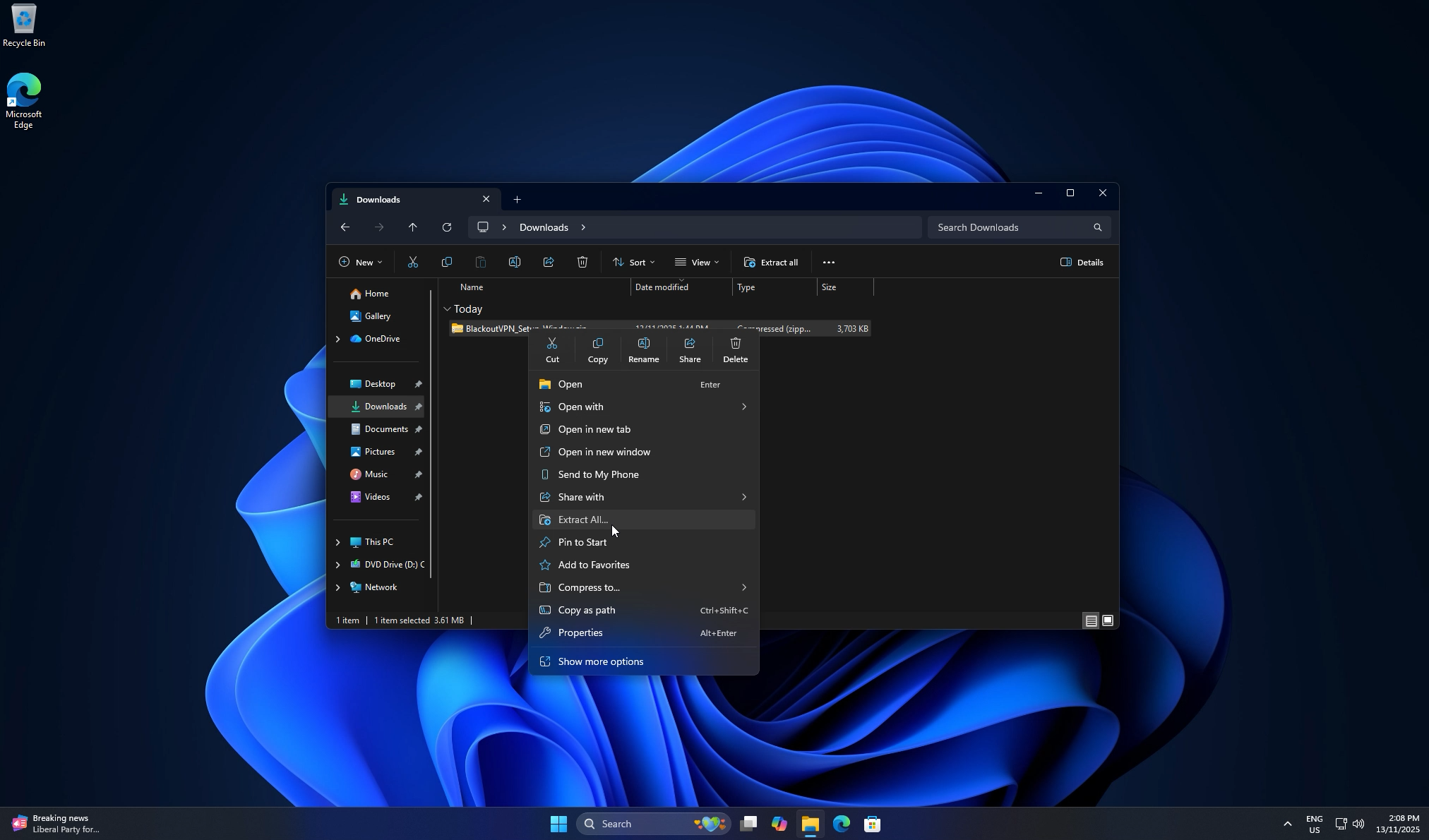
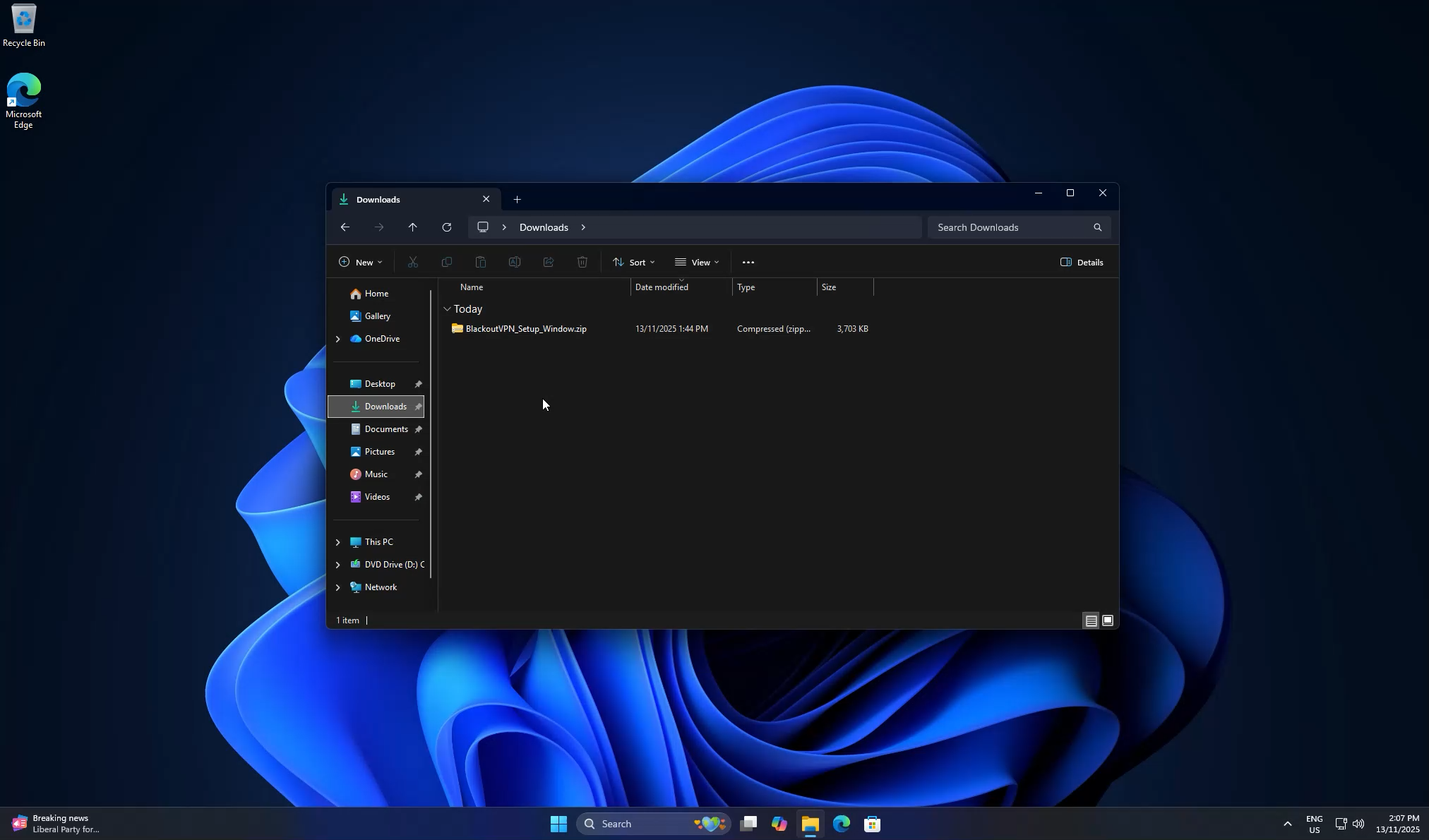
  1. Download the Windows installer ZIP file to your Downloads folder.
  2. Blackout VPN installer ZIP in the Downloads folder
  3. Right click the ZIP and choose Extract All…, then click Extract to unpack it.
  4. Using Extract All on the installer ZIP
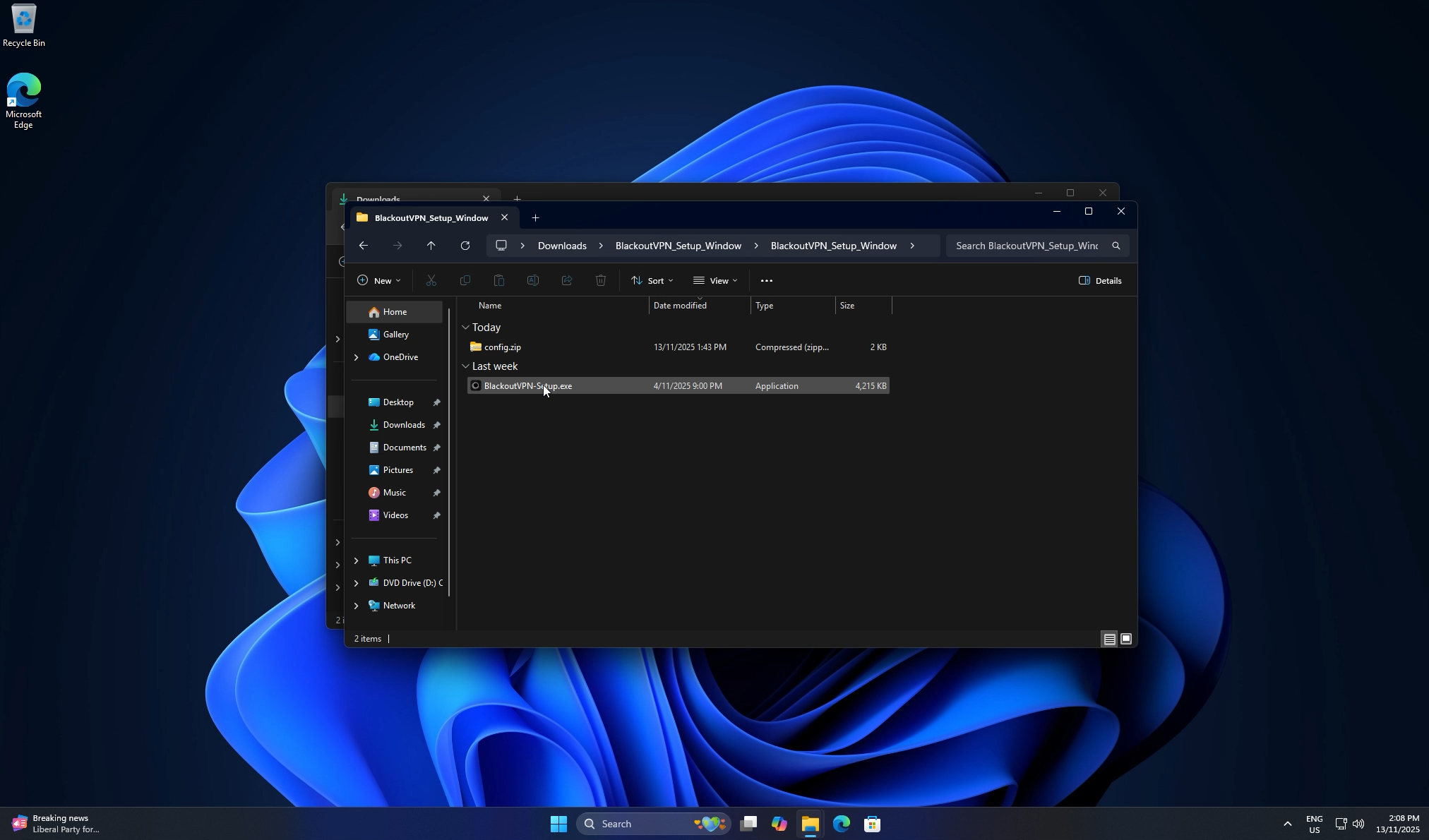
  5. Open the extracted folder. You will see BlackoutVPN-Setup.exe and config.zip.
  6. Extracted folder with installer EXE and config.zip
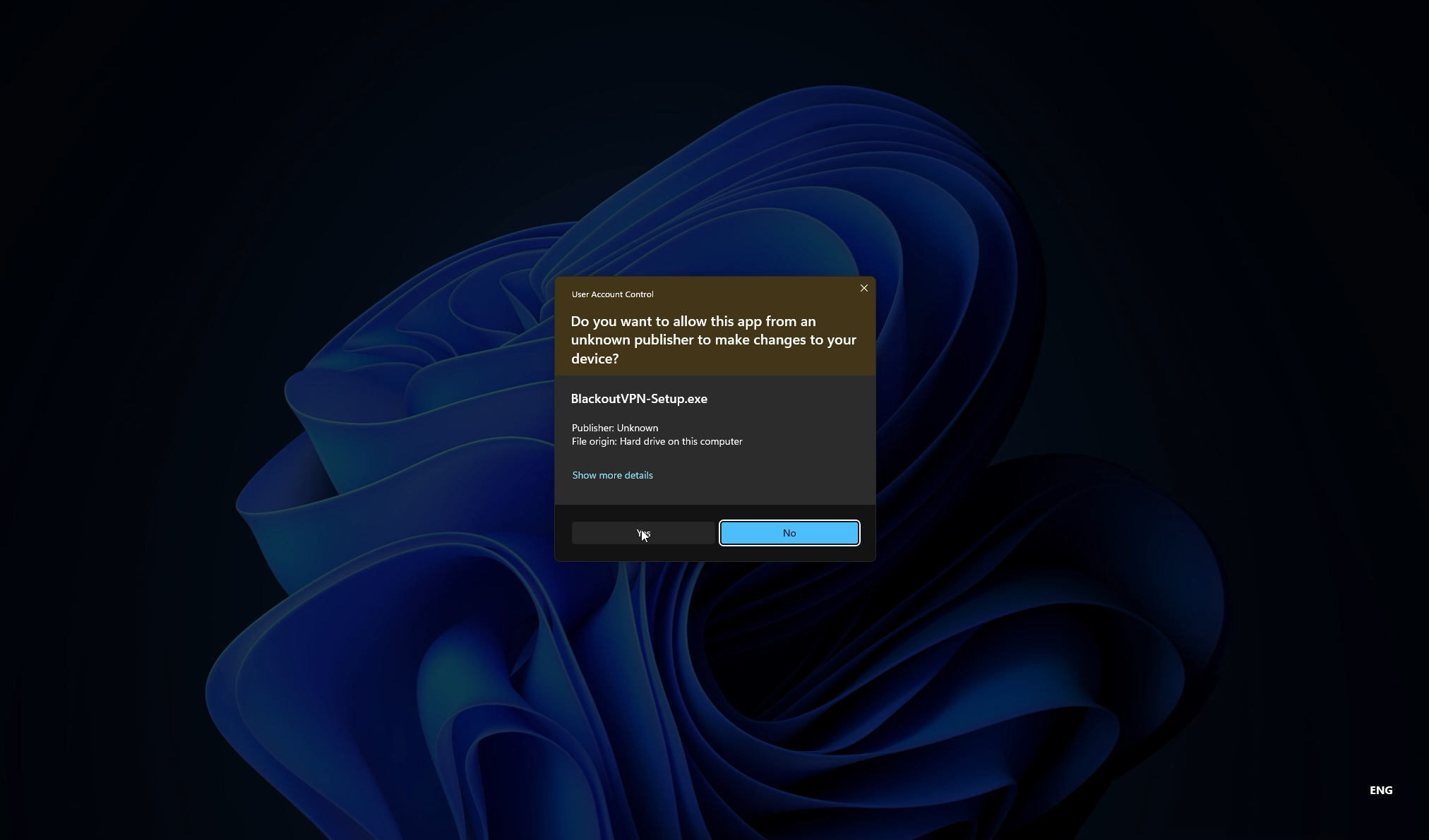
  7. Run BlackoutVPN-Setup.exe. When Windows shows a security prompt, click Yes. This is expected.
  8. Windows User Account Control prompt for the Blackout VPN setup
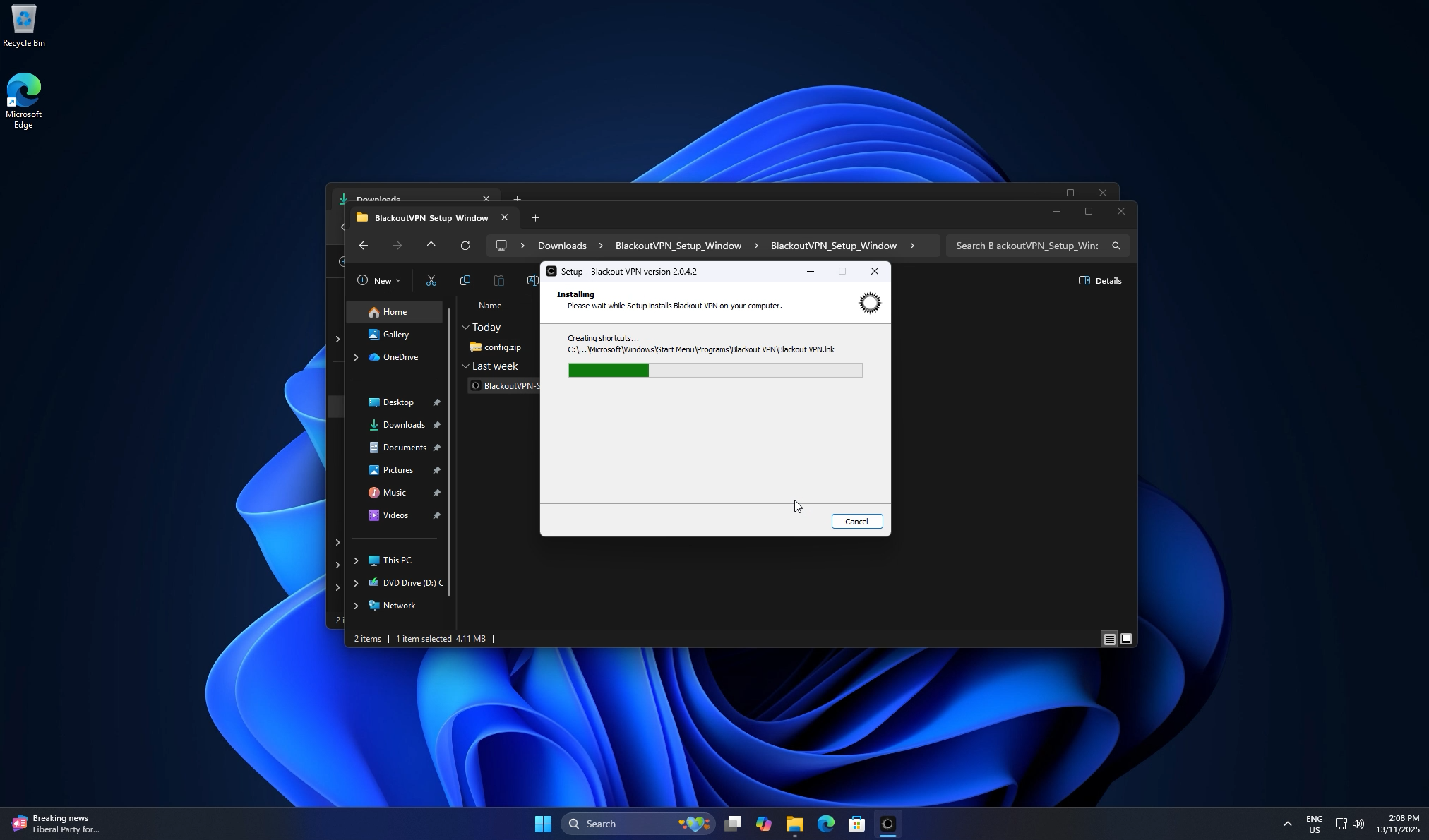
  9. Follow the setup wizard, keep the desktop shortcut checked if you want it, then click Install.
  10. Installer progress while Blackout VPN is being installed
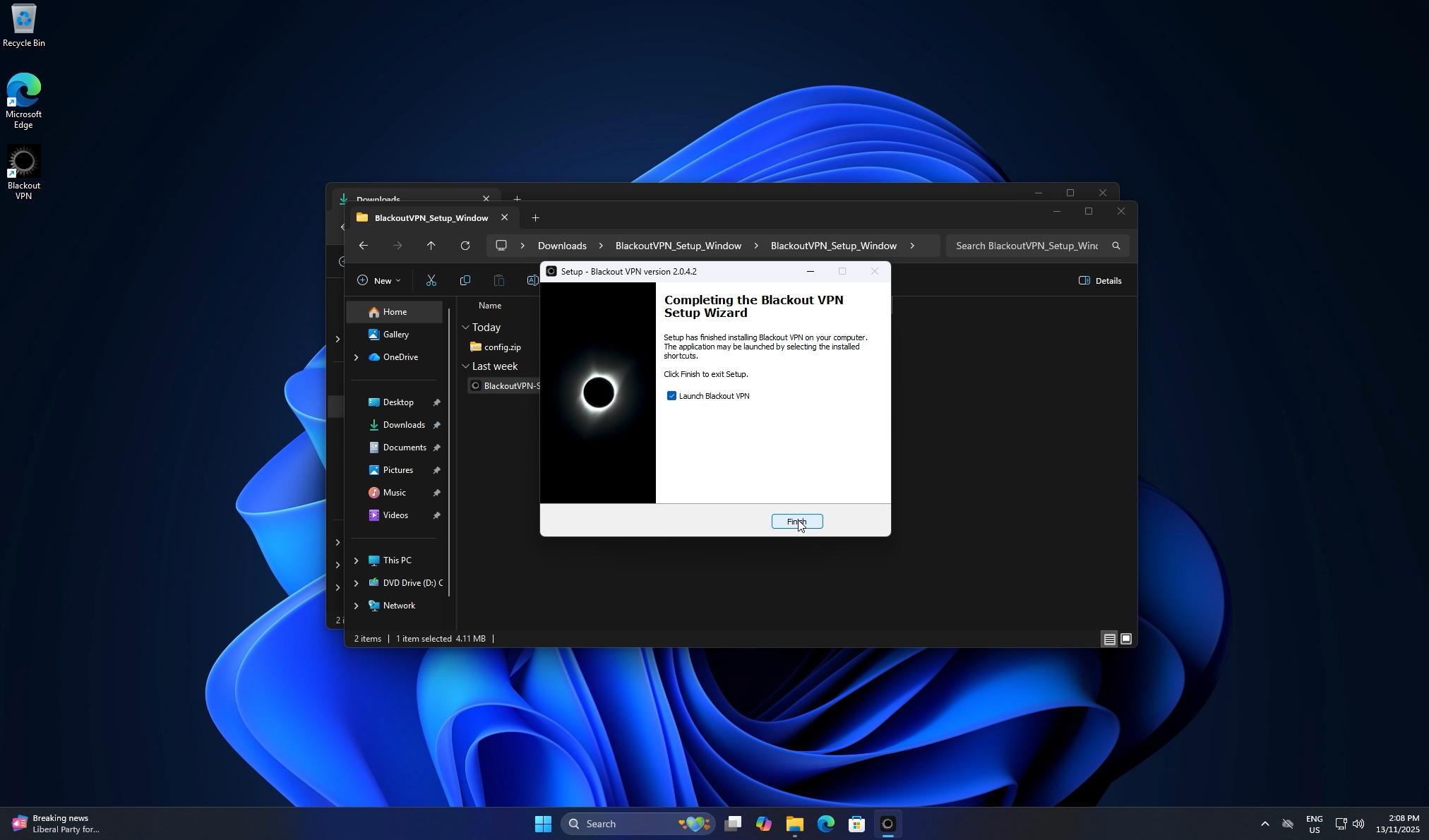
  11. When setup finishes, leave Launch Blackout VPN ticked and click Finish.
  12. Completing the Blackout VPN Setup Wizard
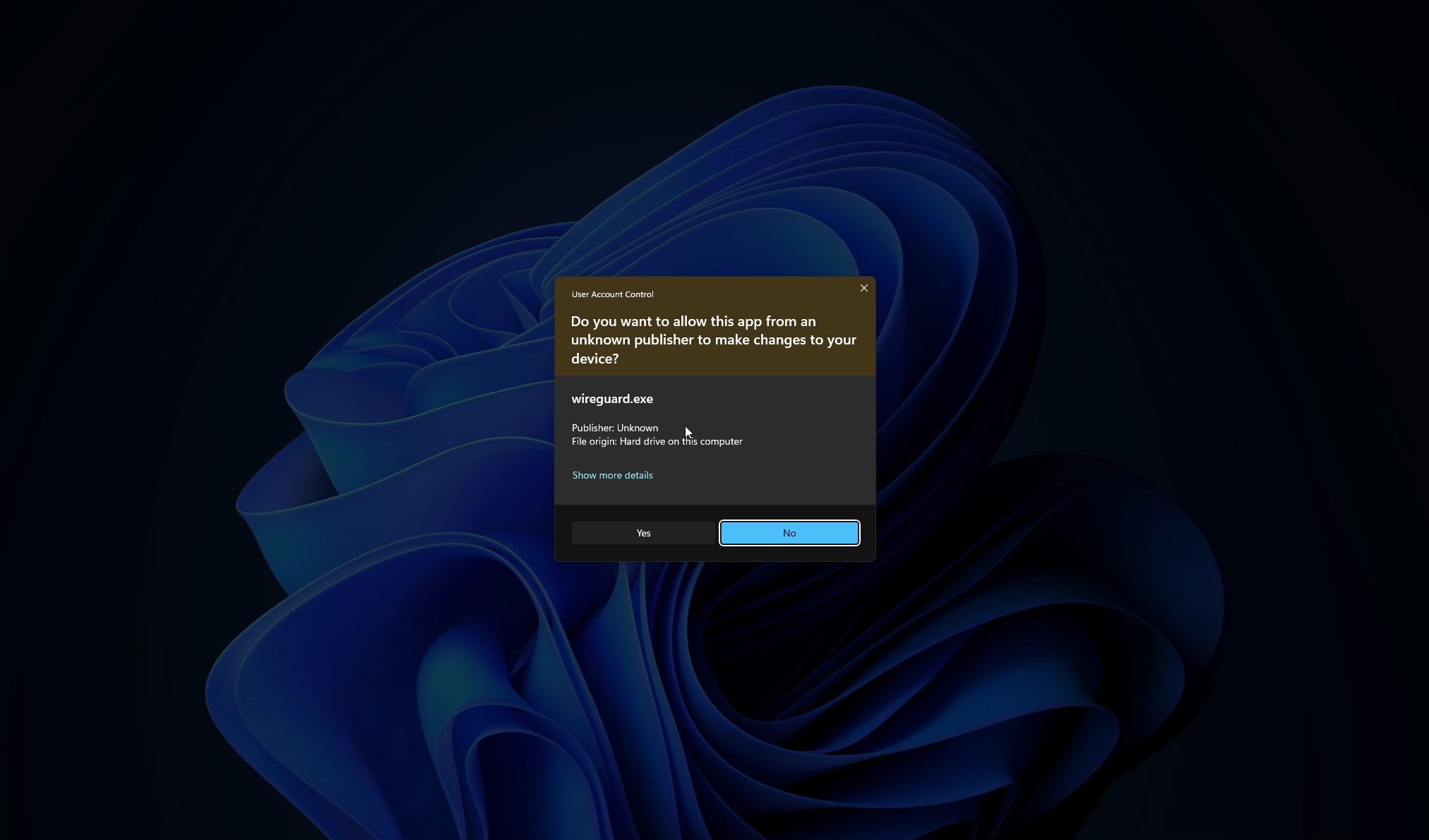
  13. Windows will ask again for permission to run the WireGuard engine. Click Yes.
  14. User Account Control prompt for wireguard.exe
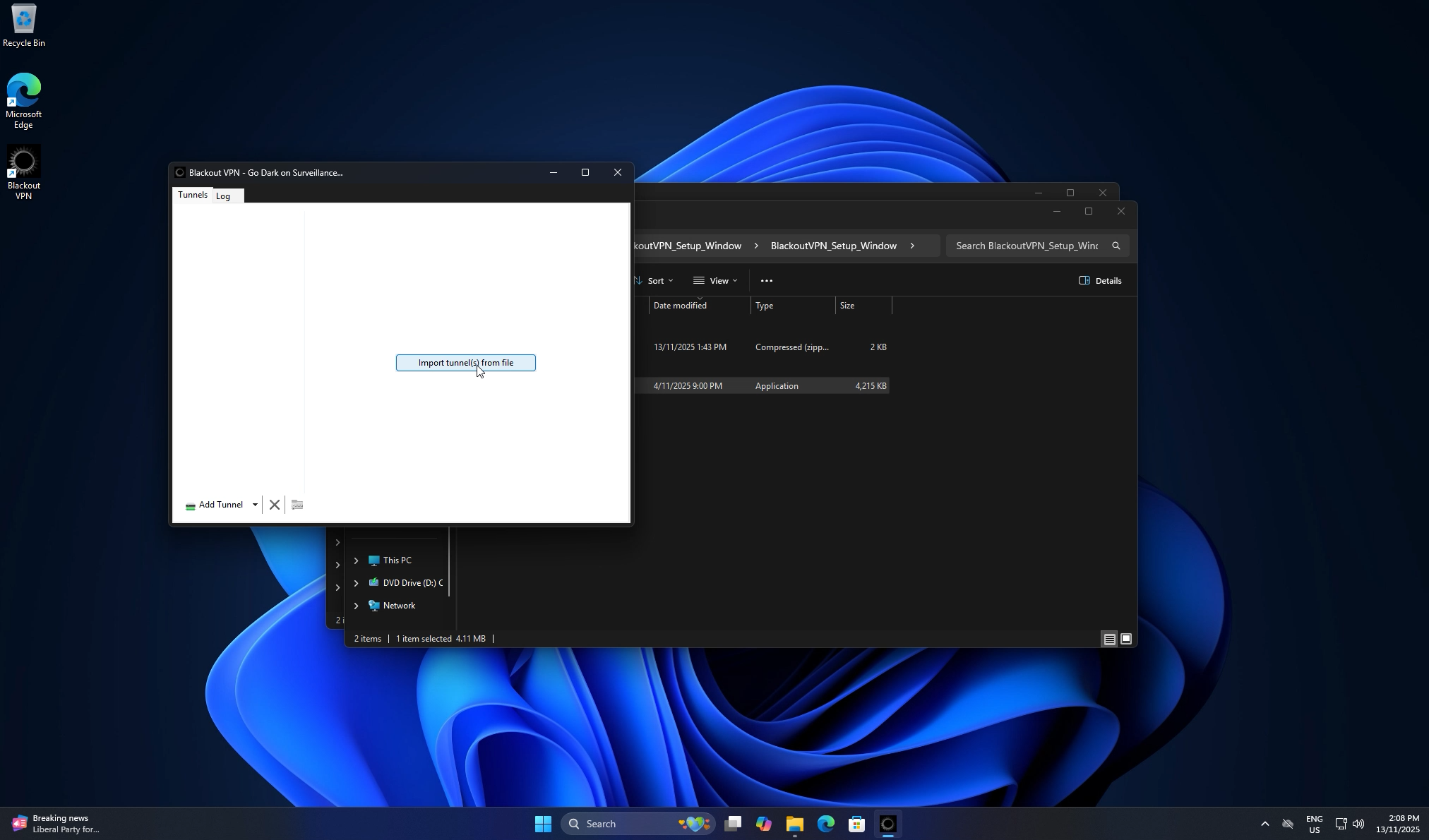
  15. Blackout VPN opens. Click Import tunnel(s) from file.
  16. Blackout VPN app showing Import tunnels from file button
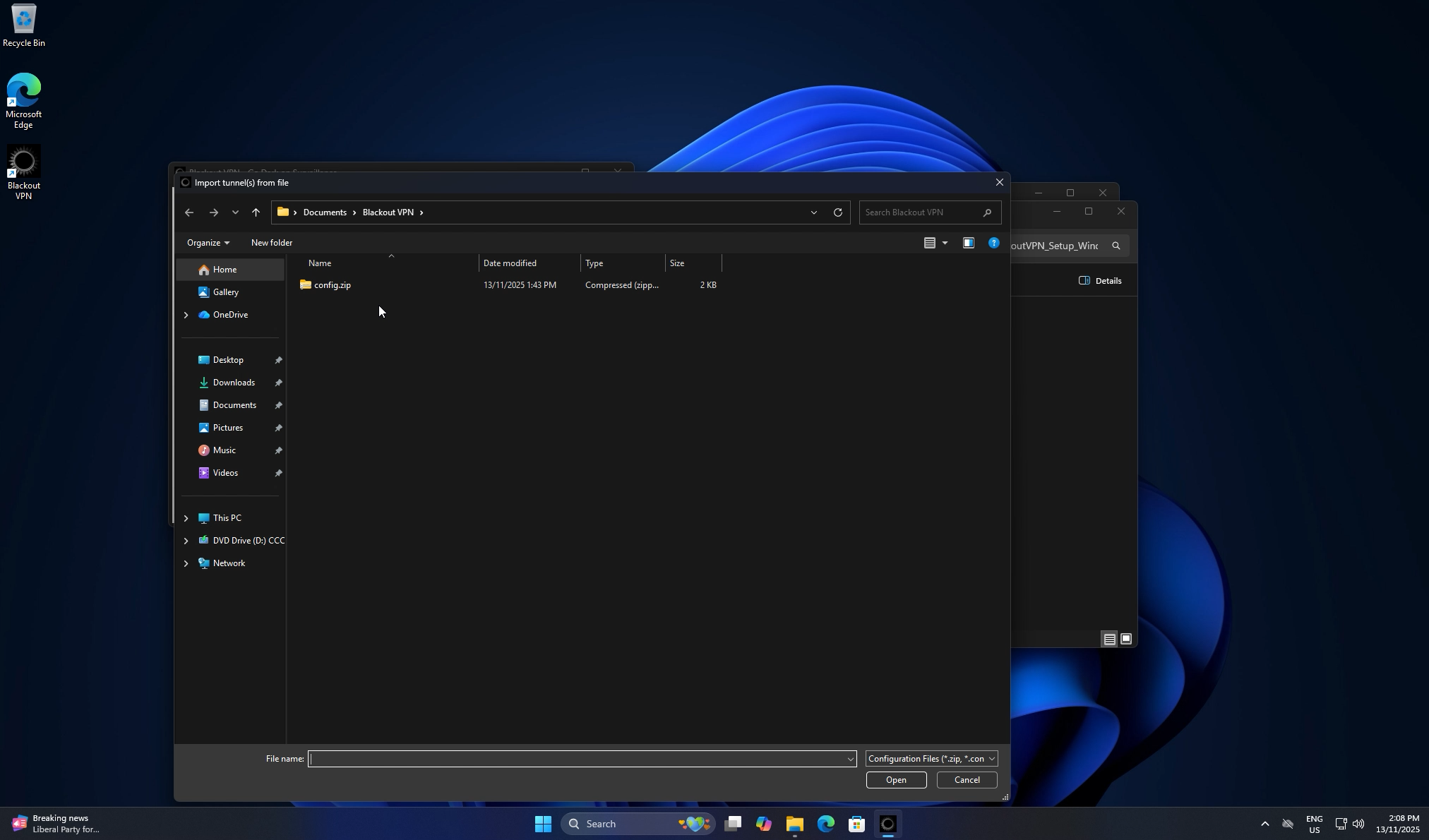
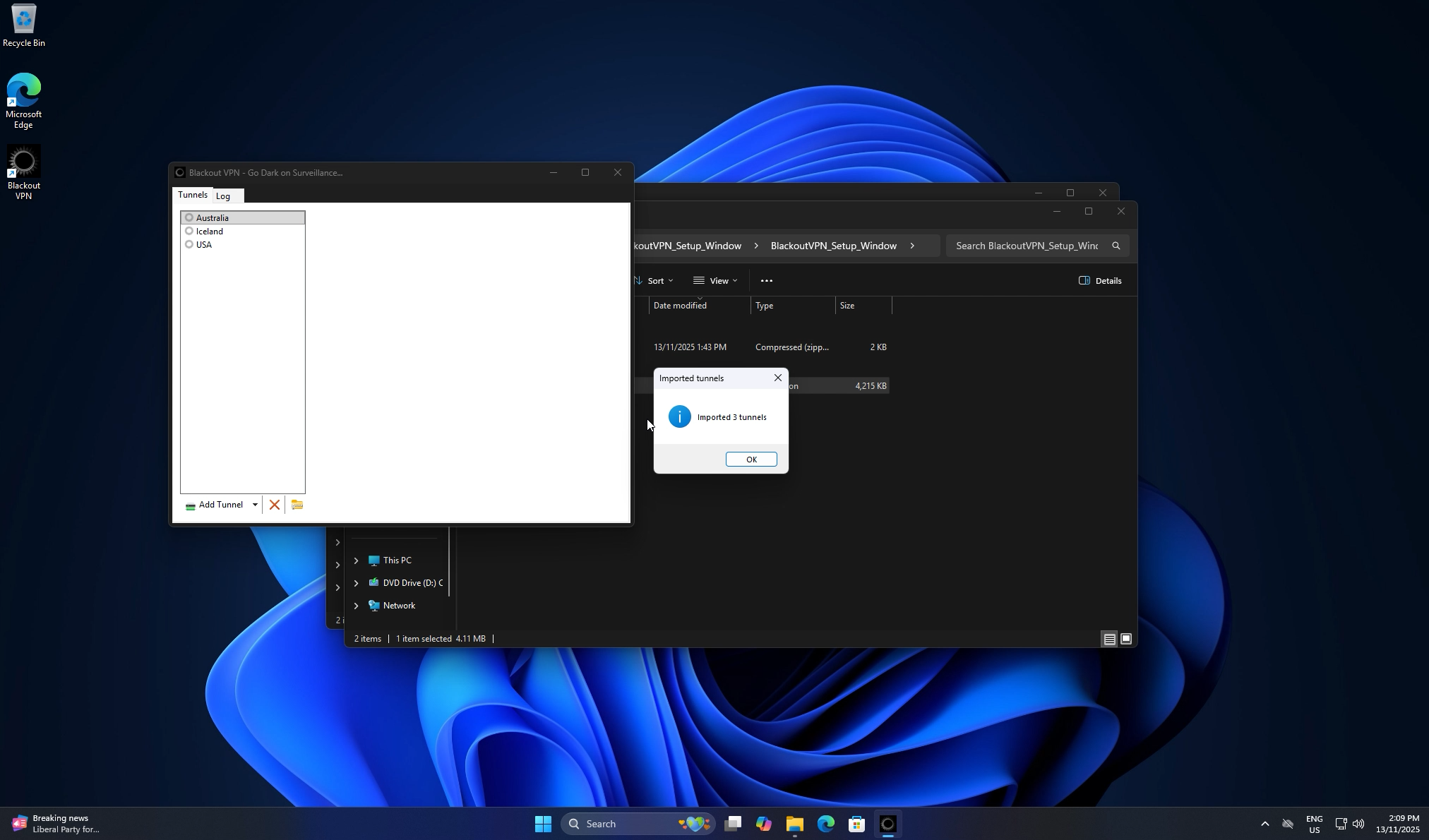
  17. Go to Documents → Blackout VPN, select config.zip, and click Open. Your keys import automatically.
  18. Selecting config.zip in the Blackout VPN folder
    Confirmation dialog showing imported tunnels
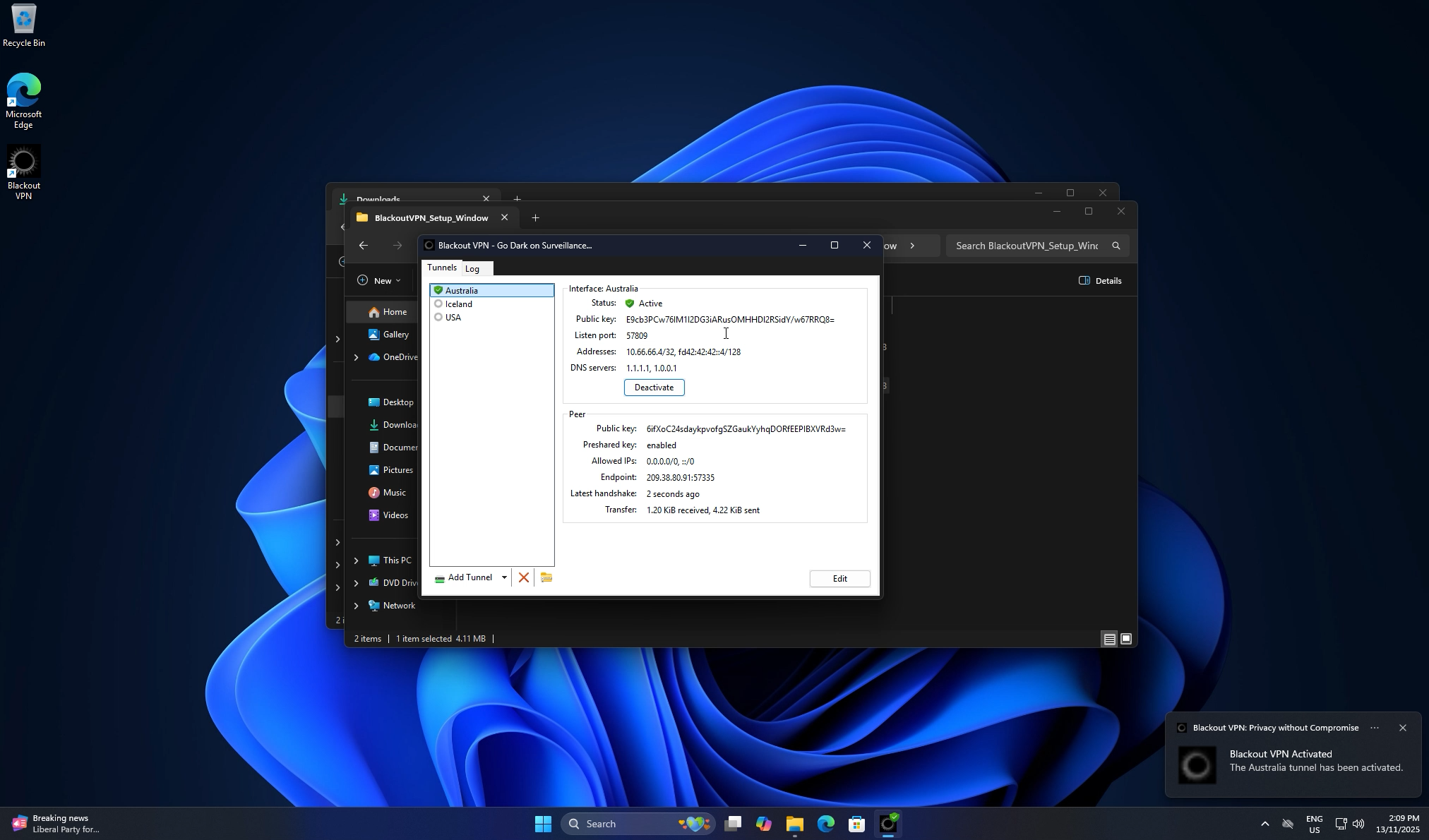
  19. Select your preferred region, click Activate, and wait for the status to turn Active. You are now connected through Blackout VPN.
  20. Active Blackout VPN tunnel with confirmation toast
    Prefer manual setup?

    Download the standard installer and import your .conf or config.zip key files yourself. These will be generated and sent to you same-day after purchase.

    Version: v2.0.4.2
    SHA256: F9355FF03D6C2A96A2A86FDDD2EEB81B85B787BB6FB9A20E497C28D2728AF97C
    File size: 4.11MB

    Manual Install